A single download wiped out nearly a decade of savings. And the scary part? It came from Apple’s own App Store.
Musician Garrett Dutton, known professionally as G. Love, lost 5.92 BTC worth more than $424,000 after downloading a fake Ledger Live app from Apple’s Mac App Store. He was simply moving his crypto setup to a new computer. What followed was a complete nightmare.
One Search, One Download, Everything Gone
Dutton searched the App Store for Ledger Live, found what looked like the real thing, and followed its instructions. The app then asked him to enter his 24-word seed phrase.
He typed it in. Within moments, his Bitcoin was gone.
“I lost 5.9 BTC all I had for ten years I worked on this,” Dutton posted on X on April 11. “Be careful out there.” The stolen funds were his retirement savings, built up over a full decade.
The theft wasn’t just quick. It was surgical.
![A smartphone showing a warning alert symbol alongside a Bitcoin logo and the Apple App Store icon, representing the dangers of fake cryptocurrency wallet apps]
Where Did the Bitcoin Go?
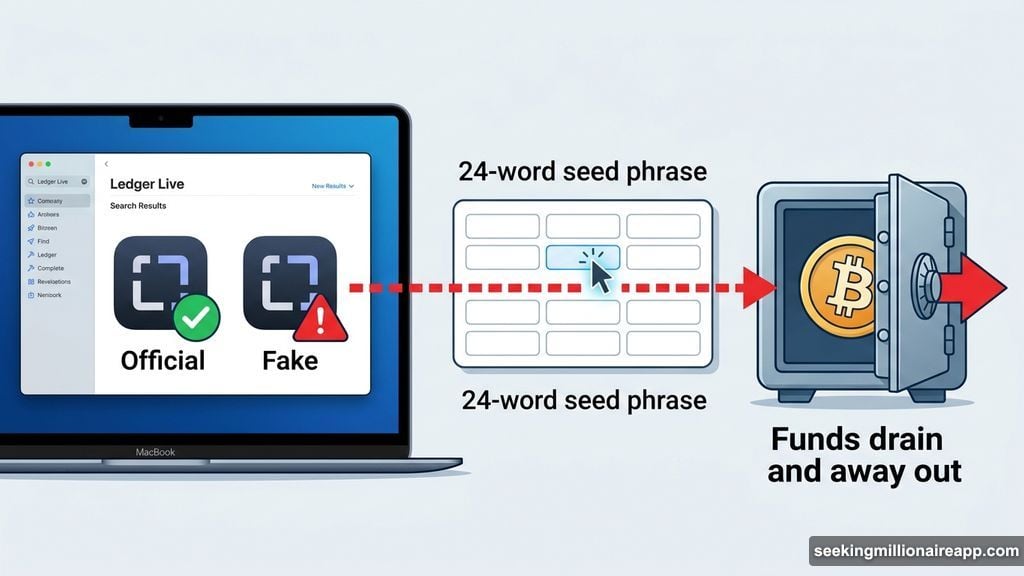
On-chain investigator ZachXBT tracked the stolen funds almost immediately. He found that the 5.92 BTC moved through addresses tied to KuCoin deposit accounts.
When asked if the funds could be recovered, ZachXBT was blunt. He said he didn’t expect KuCoin to step in. He also pointed out that KuCoin lost its MiCA (Markets in Crypto-Assets) compliance license in February 2026, just three months after receiving it. That’s a pretty short runway for a platform claiming regulatory legitimacy.
ZachXBT also noted that illicit services continue to exploit broker and personal accounts on KuCoin with little visible pushback. The large number of deposit addresses involved suggests the thieves likely routed the funds through an instant exchange to cover their tracks fast.
Why Fake Wallet Apps Are So Dangerous
Here’s the thing most people don’t realize. A hardware wallet like Ledger is supposed to be one of the safest ways to store crypto. The whole point is keeping your private keys offline, away from the internet.
But that protection disappears the moment you type your seed phrase into anything connected to the internet. A laptop. A phone. Anything.
Beau, head of security at Pudgy Penguins, put it plainly. He said crypto users should never enter a hardware wallet seed phrase on any internet-connected device, full stop. Once that phrase leaves your hardware wallet, your security model is broken.
He also flagged how these fake apps spread in the first place. Scammers push them through email campaigns, deceptive online ads, and even physical mail. Some even show up in official app stores, which gives them a veneer of legitimacy that makes them far more convincing.
![A side-by-side comparison showing the legitimate Ledger Live app interface versus warning signs of a fake crypto wallet app designed to steal seed phrases]
The Rule That Could Have Saved $424K
The security community has one firm rule around seed phrases. Treat any message, prompt, or app that asks for your recovery phrase as a scam until proven otherwise.
Legitimate wallet software will never ask for your seed phrase during a normal setup or device migration. If an app requests those 24 words, that’s your red flag. Walk away immediately.
Beau added that users should independently verify any software before downloading it, especially if prompted by an email or advertisement. Go directly to the official website. Don’t trust search results or app store listings alone.
That advice sounds simple. But it’s surprisingly easy to skip those steps when you’re in the middle of moving to a new computer and just want to get things working again.
The Harder Conversation About App Store Trust
This incident raises an uncomfortable question. If a fake crypto app can survive inside Apple’s Mac App Store long enough to steal $424,000 from a single user, how many others has it fooled?
Apple’s App Store review process is widely considered more rigorous than other platforms. Yet fraudulent apps still slip through, particularly in the crypto category. Security experts have flagged fake wallet apps appearing in major app stores repeatedly over the past few years.
For crypto users, that means app store placement alone is not enough verification. You need to cross-check the developer name, check the official project website for download links, and read recent user reviews carefully before trusting any wallet application with access to your funds.
Dutton’s story is genuinely heartbreaking. Ten years of work, gone in seconds. But the lesson it leaves behind is one every crypto holder needs to carry forward. Your seed phrase is the master key to everything. Guard it like your financial life depends on it, because it does.